

datacenters#
The datacenters function retrieves information about data centers, including plant details, operational status, and other tracking data. This is a funtion without parameters that sends a get request to Vulcan V2 datacenters endpoint that returns up-to-date infrastructure information.
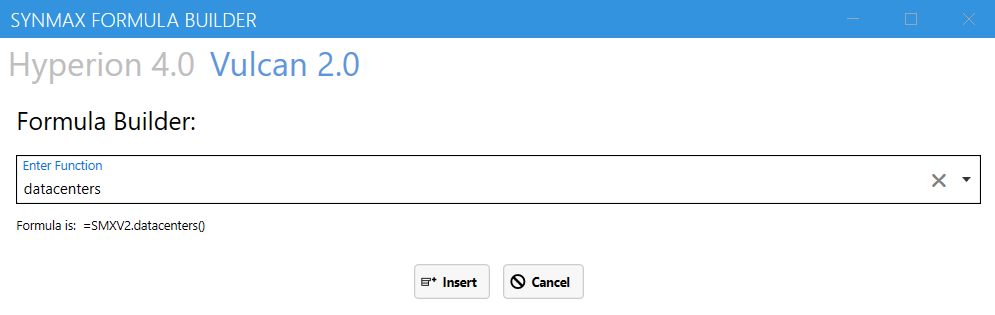
In the Formula Builder, select Vulcan 2.0, then choose the datacenters function from the Enter Function dropdown. Once selected, click Insert to automatically add the formula to Excel.
Syntax#
=SMXV2.datacenters()
Output Parameters#
When executed, this function will return data on the existing Excel worksheet displaying the output dataset with all relevant fields and records.
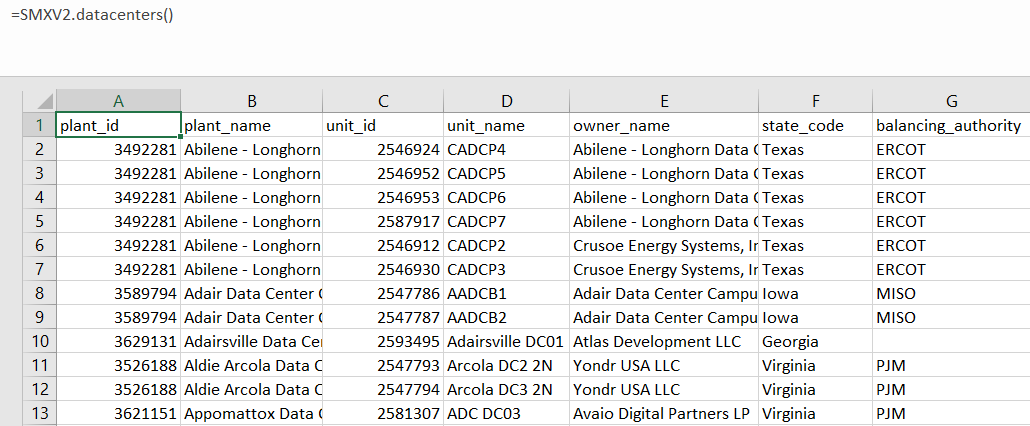
The returned excel sheet includes the following data columns:
Field |
Description |
Example |
|---|---|---|
plant_id |
IIR plant id |
3492281 |
plant_name |
IIR plant name |
Abilene - Longhorn Data Center Campus (Stargate) |
unit_id |
IIR id given to each unit for a given data center |
2546924 |
unit_name |
IIR name of each unit for a given data center |
CADCP4 |
owner_name |
IIR owner of data center |
Abilene - Longhorn Data Center Campus (Stargate) |
state_code |
2 letter state code - provided by IIR |
Texas |
balancing_authority |
IIR data center unit capacity in megawatts (MW) |
ERCOT |
unit_capacity |
IIR data center unit capacity in megawatts (MW) |
200 |
unit_status |
IIR construction status of the unit for a given data center |
Engineered |
plant_status |
IIR construction status of the data center |
Under Construction |
date_planned_operation |
IIR online date for a given data center. Format MM/DD/YYYY |
7/31/2026 |
data_center_type |
IIR type of data center |
Data Centers |
date_vulcan_status_change |
Date of which the data center status was changed to under construction. Format MM/DD/YYYY |
4/23/2025 |
date_image |
Date of the latest available satellite image. Format MM/DD/YYYY |
5/11/2025 |
vulcan_status |
Indicates if a data center has been observed to be under construction |
Confirmed |
observation |
Observations or relevant data center comments after reviewing satellite images |
land cleared |
date_construction_start |
Start date of construction for a given data center. Format MM/DD/YYYY |
1/31/2025 |
date_land_cleared |
Date of first land cleared for a given data center. Format MM/DD/YYYY |
1/31/2025 |
date_first_structures |
Date where the first permanent structures are identified for a given data center. MM/DD/YYYY |
12/30/2024 |
date_construction_50_percent_complete |
Date where a data center has been deemed to appear 50% complete |
TBD |
date_construction_completed |
Date where data center has been deemed complete based on satellite observations |
TBD |
date_vulcan_earliest_plus_7 |
The earliest possible date a data center could be operational if construction were to start 1 week after the last update. |
TBD |
date_vulcan_earliest_online |
The earliest possible date a data center is projected to be operational. Format MM/DD/YYYY |
1/20/2026 |
date_vulcan_latest_online |
The latest possible date a data center is projected to be operational. Format MM/DD/YYYY |
4/4/2028 |
days_iir_minus_vulcan_earliest_online |
The difference in days between the IIR startup date and the Vulcan earliest date |
TBD |
days_iir_minus_vulcan_latest_online |
The difference in days between the IIR startup date and the Vulcan latest date |
TBD |
synmax_id |
A unique key of plant id and unit id |
3492281-2546924 |
source |
The source of data center data |
IIR |
created_at |
ISO date on which the record was created |
TBD |
modified_at |
ISO date on which the record was modified. Format MM/DD/YYYY |
5/12/2025 |
Example Output#
plant_id |
plant_name |
unit_id |
unit_name |
owner_name |
state_code |
balancing_authority |
unit_capacity |
unit_status |
plant_status |
date_planned_operation |
data_center_type |
date_vulcan_status_change |
date_image |
vulcan_status |
observation |
date_construction_start |
date_land_cleared |
date_first_structures |
date_construction_50_percent_complete |
date_construction_completed |
date_vulcan_earliest_plus_7 |
date_vulcan_earliest_online |
date_vulcan_latest_online |
days_iir_minus_vulcan_earliest_online |
days_iir_minus_vulcan_latest_online |
synmax_id |
source |
created_at |
modified_at |
|---|---|---|---|---|---|---|---|---|---|---|---|---|---|---|---|---|---|---|---|---|---|---|---|---|---|---|---|---|---|
3492281 |
Abilene - Longhorn Data Center Campus (Stargate) |
2546924 |
CADCP4 |
Abilene - Longhorn Data Center Campus (Stargate) |
Texas |
ERCOT |
200 |
Engineered |
Under Construction |
7/31/2026 |
Data Centers |
4/23/2025 |
5/11/2025 |
Confirmed |
land cleared |
1/31/2025 |
1/31/2025 |
TBD |
TBD |
TBD |
1/20/2026 |
4/4/2028 |
TBD |
TBD |
3492281-2546924 |
IIR |
TBD |
5/12/2025 |
|
3555552 |
Ashburn (Arcola) Data Center Campus |
2547819 |
BCDC-A |
The BlackChamber Group |
Virginia |
PJM |
60 |
Under Construction |
Under Construction |
3/31/2026 |
Data Centers |
4/28/2025 |
5/11/2025 |
Confirmed |
land cleared |
1/15/2025 |
1/15/2025 |
TBD |
TBD |
TBD |
1/4/2026 |
3/19/2028 |
TBD |
TBD |
3555552-2547819 |
IIR |
TBD |
5/12/2025 |
|
3617514 |
Becker Data Center Campus |
2588169 |
Becker DC02 |
Becker Data Center Campus |
Minnesota |
MISO |
100 |
Planned |
Planned |
7/30/2027 |
Hyperscale Data Center |
5/11/2025 |
none |
TBD |
TBD |
TBD |
TBD |
TBD |
TBD |
3617514-2588169 |
IIR |
TBD |
5/12/2025 |
||||||
3529564 |
Conover Lyle Creek Data Center CLT04/5/6/7/8 Campus |
2559177 |
CLT04 |
Microsoft Corporation |
North Carolina |
48 |
Under Construction |
Under Construction |
6/30/2025 |
Hyperscale Data Center |
5/12/2025 |
4/28/2025 |
Confirmed |
land cleared |
3/30/2024 |
3/30/2024 |
TBD |
TBD |
TBD |
3/19/2025 |
6/2/2027 |
TBD |
TBD |
3529564-2559177 |
IIR |
TBD |
5/12/2025 |
Errors#
Functions may return the following error messages:
Error |
Description |
|---|---|
#VALUE! |
Input parameters are invalid or cannot be parsed. |
#REF! |
The function cannot retrieve data from the SynMaxax API due to a network or connectivity issue. |
!!! EXCEPTION |
Invalid input parameters. Make sure dates are enclosed in quotes. Check if the API key is valid. To know more about how to use an API key, please check the section on authentication. |
#No Data |
Input data is invalid or does not exist. |
Note
You can also check the logs for more information on errors. You can access the logs by clicking on SynMax Commodities on the Excel ribbon and then clicking on Logs.